Touch Typing vs Hunt-and-Peck: Why Technique Matters More Than Speed
Hunt-and-peck typists average around 27-37 WPM. Touch typists average 40-70+. Here's why the two methods diverge so much, and how to actually make the switch.
On this page8 sections
Open almost any office in the world and you'll find two very different typing styles happening side by side: people whose hands rest quietly on the keyboard while their eyes stay locked on the screen, and people whose eyes dart constantly between the keys and the monitor, hunting for the next letter. Both groups get their work done. But the gap between how fast they do it is bigger than most people realize, and it isn't just a matter of practice — it comes down to a structural difference in how each method actually works.
What touch typing actually is
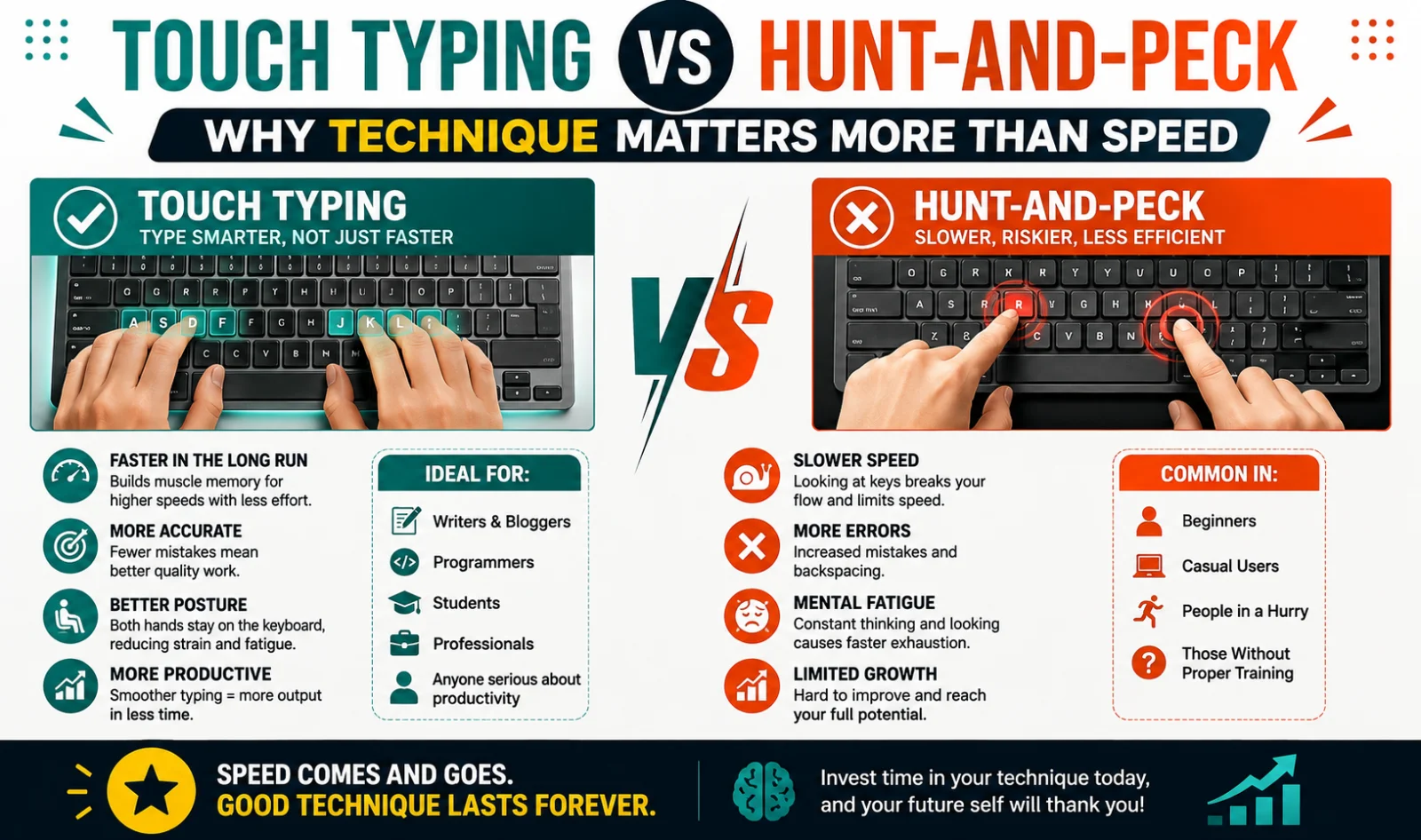
Touch typing is a technique where each finger is assigned to a specific set of keys, and the typist strikes those keys from memory without looking at the keyboard. The foundation of the method is the home row — the middle row of letter keys (A-S-D-F for the left hand, J-K-L-; for the right hand) — which the fingers rest on between keystrokes and return to after reaching for another key. Because every finger has a fixed "zone" of responsibility, the brain doesn't have to consciously search for each letter; it simply signals the correct finger to move, the same way a trained pianist doesn't consciously search for each key on a piano.
This is what makes touch typing fundamentally different from just "typing fast" — it's a specific, learnable technique built around muscle memory, not raw effort or familiarity with a particular keyboard layout.
What hunt-and-peck typing actually is
Hunt-and-peck typing, sometimes also described loosely as "two-finger typing," is the more intuitive, self-taught approach most people start with. The typist visually scans the keyboard to locate each key, then presses it — typically using the index fingers, sometimes with a thumb for the space bar and occasionally a couple of additional fingers for frequently used keys. Many long-time hunt-and-peck typists develop a hybrid style over years of practice, memorizing the position of common letters while still glancing down for less familiar ones.
It's a completely functional way to type, and plenty of experienced hunt-and-peck typists move faster than beginners assume. But the method has a built-in bottleneck that touch typing doesn't share, and that bottleneck is the entire reason the speed gap between the two methods exists.
The speed gap, with real numbers
Across multiple independent sources measuring typing speed by method, the pattern is remarkably consistent. Hunt-and-peck typists average roughly 27 words per minute when copying text, and slightly higher — around 37 WPM — when typing from memory rather than reading off a source document, with skilled hunt-and-peck typists occasionally reaching into the 50-70 WPM range through years of familiarity. Touch typists, by comparison, typically average 40-60 WPM even at a moderate skill level, with practiced touch typists regularly exceeding 80-100 WPM.
| Method | Typical average WPM | Realistic ceiling |
|---|---|---|
| Hunt-and-peck (2 fingers) | 20-35 WPM | ~50-60 WPM with heavy practice |
| Hunt-and-peck (hybrid, 3-4 fingers) | 35-50 WPM | ~60-70 WPM, rare above this |
| Touch typing (learning stage) | 30-40 WPM | Continues rising with practice |
| Touch typing (developed) | 50-70 WPM | 80-100+ WPM achievable |
| Touch typing (advanced/competitive) | 90-120+ WPM | 150+ WPM for elite typists |
The reason this gap exists isn't simply that touch typists have practiced more, though practice plays a role. It's structural: hunt-and-peck typing requires a visual search step for nearly every keystroke — locate the key, decide which finger to use, move that finger, press, then find the next key — and that search process takes real time no matter how familiar someone becomes with a keyboard layout. Touch typing removes the visual search step entirely. Because every finger already has a fixed assignment and the hands never leave their home position for long, movements become short, direct reaches rather than searches, and skilled touch typists can even begin moving toward the next key while still completing the current keystroke — a kind of overlap that simply isn't possible when typing with two fingers scanning visually across the board.
This is also why the gap widens rather than narrows at higher speeds. A determined hunt-and-peck typist can push past the average and reach 50-60 WPM through sheer familiarity, but that's close to the practical ceiling for the method. Touch typists don't hit an equivalent hard ceiling in the same way — speed keeps climbing with practice well past the point where hunt-and-peck plateaus.
Accuracy and error correction
Speed is the more commonly cited difference, but accuracy tells a similarly one-sided story, and it compounds the speed gap rather than existing separately from it. Because touch typists keep their eyes on the screen throughout, they tend to notice a typo almost immediately after it happens and correct it in the moment. Hunt-and-peck typists, whose attention is frequently on the keyboard rather than the screen, often don't notice an error until they glance back up — sometimes after typing several more words past the mistake, which means more text has to be reviewed and corrected, not just the one wrong character.
This matters because every correction costs meaningfully more time than the keystroke that caused it — backspacing, re-locating the cursor, and re-typing a section easily costs several times the length of the original error. When error-correction time is factored in, the effective, real-world speed gap between the two methods ends up even larger than the raw WPM numbers alone suggest.
Physical strain and long-term comfort
The ergonomic difference between the two methods is less talked about than speed, but it matters for anyone typing for hours at a stretch. Hunt-and-peck typing typically involves more neck flexion — the head tilting forward and down to look at the keyboard, repeated hundreds or thousands of times across a workday — which can contribute to neck and upper-back strain over time. It also tends to involve more irregular hand and wrist positioning, since the hands are constantly repositioning to reach for keys rather than resting in one stable zone.
Touch typing, by keeping the hands anchored near the home row and the head upright and facing the screen, generally produces a more consistent, less strain-inducing posture over long typing sessions — one more reason the technique is often recommended not just for speed, but for anyone doing heavy, sustained typing work as part of their job.
Is hunt-and-peck ever fine to stick with?
Not every typing situation demands touch typing. If your typing volume is genuinely low — occasional short messages, infrequent form-filling — the investment required to switch methods may not be worth it for you personally. Hunt-and-peck also isn't "wrong" in any absolute sense; it's simply a method with a lower practical ceiling, and plenty of people get by comfortably within that ceiling.
Where it becomes a real limitation is in any role or habit involving sustained, high-volume typing — writing, coding, customer support, data entry, transcription, or simply spending several hours a day in documents and messaging. In those situations, the gap between 30 WPM and 60 WPM isn't a minor convenience; over a full workday, it's the difference between finishing typing-heavy tasks with time to spare and constantly feeling behind.
How to actually make the switch
Learning touch typing as an adult is entirely achievable — age doesn't meaningfully limit the ability to learn it, though existing hunt-and-peck habits do need to be deliberately unlearned rather than simply built on top of.
Start with home row placement. Rest your left hand fingers on A-S-D-F and your right hand fingers on J-K-L-;, with your thumbs over the space bar. Most keyboards have small physical bumps on the F and J keys specifically so your fingers can find home position without looking.
Learn the finger-to-key map before chasing speed. Every key on the keyboard has an assigned finger based on its position relative to the home row. Spend the first stretch of practice focused entirely on hitting the right key with the right finger, even slowly — speed built on the wrong finger assignments has to be unlearned later, which costs more time than starting correctly.
Resist the urge to look down. This is the hardest habit to break, especially early on, since looking down feels like it should be faster in the moment. It isn't, once the muscle memory develops — but during the first few weeks, the temptation to peek is strong, and every peek slightly delays the muscle memory from forming.
Expect a temporary speed drop. Almost everyone who switches from an established hunt-and-peck habit to touch typing gets slower before they get faster, typically for the first two to four weeks. This is a normal, expected part of retraining the motor pattern, not a sign that the switch isn't working.
Practice in short, frequent sessions. Ten to fifteen minutes of focused practice most days builds the underlying muscle memory faster than occasional long sessions, since the skill is built through repetition rather than endurance.
Use a genuine keyboard practice test, not just casual typing. Practicing on real, varied text — rather than only ever typing the same few familiar phrases — forces your fingers to learn the full keyboard rather than a narrow, memorized subset of it. A structured keystroke test or typing counter that tracks your WPM and accuracy over time gives you real feedback on whether the technique is actually taking hold, rather than relying on a subjective sense of how fast typing feels.
Checking your real progress
Because typing speed can feel faster or slower than it actually is — especially while you're mid-transition between two different techniques — the most reliable way to track whether touch typing is actually paying off is to test your typing counter regularly against a real benchmark. A typing speed test measures your WPM and accuracy over a standardized passage, giving you an objective keyboard writing test result to compare over time, rather than guessing based on how the session felt.
For a fuller sense of what a "good" number actually looks like once you've made progress, our guide on what's a good WPM breaks down real benchmarks by age, job, and skill level — and if you're just getting started with a structured plan rather than switching cold, how to type faster: a 30-day practice plan lays out a week-by-week approach you can follow alongside learning proper touch-typing form. Read more there once you're ready to put a number and a timeline on the switch.
Conclusion
The gap between touch typing and hunt-and-peck isn't really about effort or how long someone has been typing — it's structural. Hunt-and-peck requires a visual search for nearly every keystroke, which creates a hard ceiling somewhere around 50-60 WPM even for experienced practitioners. Touch typing removes that search step entirely, which is why average speeds run higher and the ceiling keeps rising with practice well past where hunt-and-peck plateaus. If your typing volume is light, hunt-and-peck may never need to change. But for anyone doing sustained, high-volume typing as part of their work, the switch — despite a temporary slowdown while the new habit forms — tends to pay for itself within weeks, not months.
Was this guide useful?
Your vote is anonymous and helps us decide what to write next.
Frequently asked questions
Is touch typing actually faster than hunt-and-peck?
Yes, on average. Hunt-and-peck typists average roughly 27-37 WPM, while touch typists average 40-70 WPM, with skilled touch typists regularly exceeding 100 WPM. The gap exists because hunt-and-peck requires a visual search for nearly every keystroke.
Can hunt-and-peck typists ever type as fast as touch typists?
At the lower-to-middle range, yes — a fast, experienced hunt-and-peck typist can outpace a beginner touch typist. But at the higher end, hunt-and-peck hits a practical ceiling around 50-70 WPM, while touch typing has no comparable hard limit.
How long does it take to learn touch typing as an adult?
Most people notice their touch-typing speed exceed their old hunt-and-peck baseline within three to six weeks of consistent, short daily practice sessions. There's typically a temporary speed drop in the first two to four weeks as the new motor pattern replaces the old habit.
Is it too late to switch from hunt-and-peck to touch typing?
No. Adults of any age can successfully learn touch typing — it may take slightly more deliberate unlearning of existing habits than it would for a child starting fresh, but the underlying skill develops the same way at any age.
Why is touch typing more accurate than hunt-and-peck?
Because touch typists keep their eyes on the screen rather than the keyboard, they tend to notice and correct errors immediately. Hunt-and-peck typists often don't notice a mistake until glancing back up, sometimes after typing several more words past the error.
What is the home row in touch typing?
The home row is the middle row of letter keys — A-S-D-F for the left hand and J-K-L-; for the right hand — where the fingers rest between keystrokes and return to after reaching for other keys. Most keyboards have raised bumps on the F and J keys to help you find this position without looking.
How can I track my progress switching from hunt-and-peck to touch typing?
A structured typing speed test or keystroke test taken regularly gives you an objective WPM and accuracy score to compare over time, which is more reliable than judging progress by how typing feels in the moment.